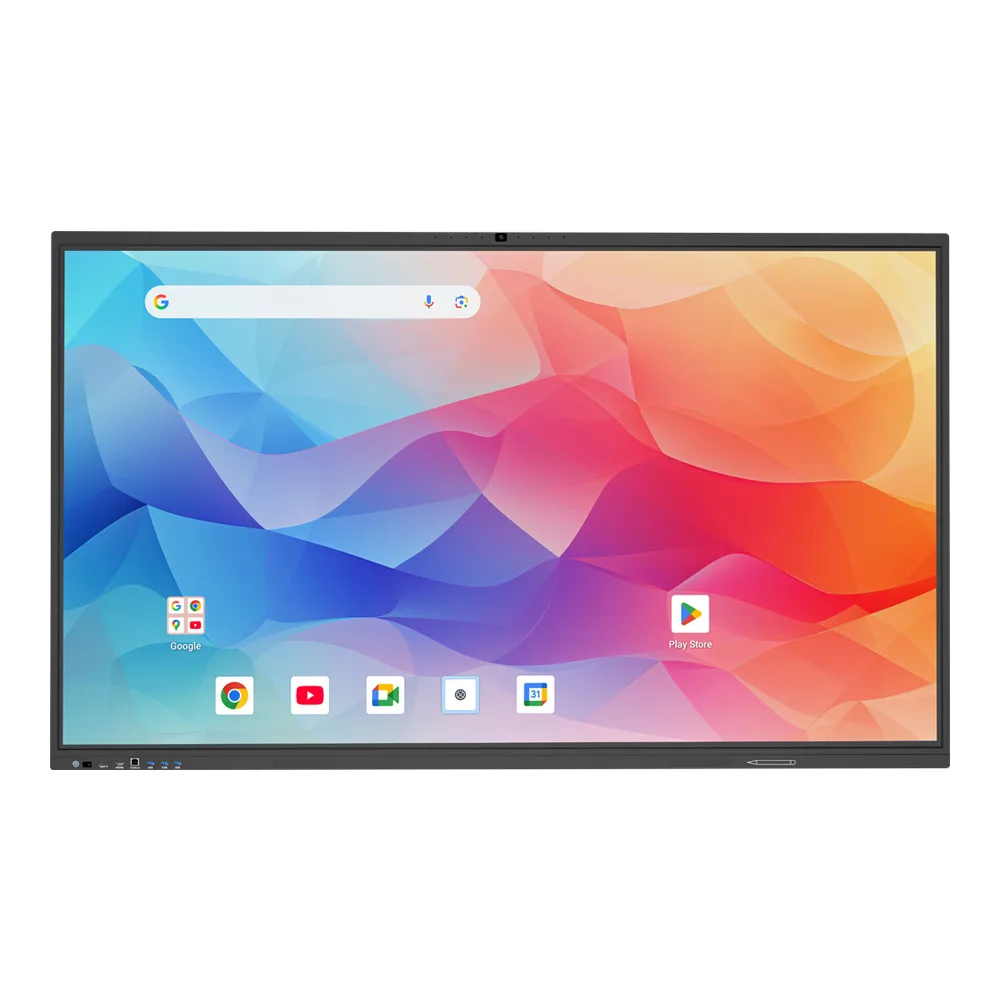
SLINVUE RK3576 Android Interactive Flat Panel with Android 16 and EDLA
This android interactive flat panel runs Android 16 on the RK3576 mainboard, with Google EDLA access and an AI assistant.
- AI Smart Assistant
- Speech to Text, Q&A, Meeting Minutes, AI Smart Assistant
- AI Smart Assistant supports three-finger wake-up and voice wake-up (wake-up word: Hello, hello)
- Gesture Control supports gestures such as single-finger confirmation, scissor hand screenshot, fist return, and five-finger spread to return to the homepage
- AI Graphic and Text Recognition supports AI text box selection recognition and picture box selection recognition
- Support multi-language handwritten text recognition, supports over 10,000 handwritten graphic recognition model libraries, box selection recognition search is rich in both text and images
- Whiteboard Educational supports the insertion of multiple educational plugins: planet, periodic table of elements, piano, formula, function, statistical chart and crossword, scoreboard, Random number
- H5 Remote Control: Mobilephone H5 remote control operation, touchpad operation
Overview
This SLINVUE interactive flat panel runs Android 16 on the RK3576 mainboard. Google EDLA is enabled, so the panel has Google ecosystem access. The AI assistant handles speech to text, Q&A and meeting minutes, and it wakes on a three-finger touch or a voice wake-up word.
Gesture control covers single-finger confirm, scissor-hand screenshot, fist return and five-finger spread to home. Handwriting recognition works across multiple languages and draws on over 10,000 handwritten graphic recognition model libraries. Screen sharing uses projection software selectable on request, plus H5 phone remote control and touchpad operation. Split screen supports left and right, top and bottom, and quad screen layouts.
Specification
| Mainboard | RK3576 |
| OS | Android 16 |
| Google EDLA | EDLA-enabled, Google ecosystem access |
| AI assistant | Speech to text, Q&A, meeting minutes; three-finger and voice wake-up |
| Gesture control | Single-finger confirm, scissor-hand screenshot, fist return, five-finger spread to home |
| Handwriting recognition | Multi-language handwritten text recognition, over 10,000 handwritten graphic recognition model libraries |
| Screen sharing | Screen projection software selectable on request; H5 phone remote control and touchpad |
| Split screen | Left and right, top and bottom, quad screen |
Standard configuration. Sizes, system image and peripherals can be built to your order.
Where it fits
Meeting rooms
Run the AI assistant for speech to text, Q&A and meeting minutes, and share screens through H5 phone remote control or touchpad operation.
Classrooms and training rooms
Use multi-language handwriting recognition, box selection search, and whiteboard plugins such as periodic table, piano, formula, function and statistical chart.
Multi-source review
Split the panel left and right, top and bottom, or into quad screen, and switch layouts with five-finger spread to home.
Questions buyers ask us
Which operating system and mainboard does this panel use?
It runs Android 16 on the RK3576 mainboard, with Google EDLA enabled for Google ecosystem access.
How does the AI assistant wake up?
Three-finger wake-up and voice wake-up are supported. The wake-up word is Hello, hello.
What screen sharing options are available?
Screen projection software is selectable on request. H5 phone remote control and touchpad operation are also supported.
Other models in this line

Guides on this range
Smart board price: what an interactive flat panel costs
Smart board price depends on panel size, grade, touch tech, SoC, RAM, storage, OPS, camera, mounting and shipping. Learn
Smart board sizes: choosing 65, 75, 86 or 98 inch
Smart board sizes guide for integrators: how room type, viewing distance, ceiling height and delivery path determine the
Request a quote
Send the model, size and quantity you are quoting. You get a spec sheet and a price back within 24 hours.
- Lead time
- Bulk orders in as little as 15 days
- Build options
- OEM and ODM
- Support
- 24/7 technical and customer support